
Mermaid Anywhere — Documentation
Complete guide to installing, using, and contributing to the extension.
Installation
Chrome Web Store (Recommended)
- Visit the Chrome Web Store listing
- Click “Add to Chrome”
- Confirm the permissions prompt
- Navigate to any page with Mermaid code blocks — diagrams render automatically
Load Unpacked (Developer Mode)
- Clone the repository:
git clone https://github.com/starmorph/mermaid-anywhere.git
- Install dependencies and build:
pnpm install && pnpm build
- Open
chrome://extensionsin Chrome - Enable “Developer mode” (top right toggle)
- Click “Load unpacked” and select the
distfolder
How It Works
Mermaid Anywhere uses a multi-step architecture to render diagrams safely within Chrome's extension security model.
Rendering Pipeline
Content Script detects Mermaid code
Scans the page for code blocks with the language-mermaid CSS class. Runs at document_idle and observes DOM mutations for dynamically loaded content.
Service Worker receives render request
The content script sends the Mermaid source code to the background service worker via chrome.runtime.sendMessage.
Offscreen Document renders SVG
The service worker forwards the request to an offscreen document where mermaid.js runs with full DOM access and no CSP restrictions.
SVG injected into the page
The rendered SVG is sent back through the service worker to the content script, which injects it into a Shadow DOM container on the page.
Why the Offscreen Document?
Mermaid.js v10+ uses Function() internally for dynamic code evaluation. Chrome extensions enforce a strict Content Security Policy (CSP) that blocks eval() and Function() in content scripts and service workers. The offscreen document runs in its own context with relaxed CSP, allowing mermaid.js to function normally. The offscreen document auto-closes after 30 seconds of inactivity to conserve resources.
Shadow DOM Isolation
Each rendered diagram is wrapped in a Shadow DOM container. This ensures the extension's styles (toolbar, diagram wrapper, error messages) don't leak into the host page, and the host page's CSS doesn't affect the diagram rendering. The result is consistent, clean diagrams on any website.
Supported Sites
Mermaid Anywhere works on any page that uses language-mermaid or language-mmd CSS classes on code blocks. Here are the sites we've tested:
| Site | Domain | Notes |
|---|---|---|
ChatGPT | Renders Mermaid code blocks in AI responses | |
Claude | Renders Mermaid artifacts and code blocks | |
GitHub | README files, issues, PRs, comments | |
Stack Overflow | Questions and answers with Mermaid code | |
Confluence | Wiki pages with Mermaid code blocks | |
Jira | Issue descriptions and comments | |
Notion | Code blocks marked as Mermaid |
Don't see your site? Open an issue and we'll investigate adding support.
Permissions Explained
Mermaid Anywhere requests only two permissions — the minimum needed to function.
activeTabAccess the current tab to detect and replace Mermaid code blocks with rendered SVG diagrams.
offscreenCreate an offscreen document where mermaid.js can run safely. Required because Mermaid v10+ uses Function() which Chrome extension CSP blocks in content scripts.
No host permissions. The extension uses content_scripts with <all_urls> matching to inject the detector, but the only data it reads is the text content of Mermaid code blocks. No network requests, no cookies, no browsing history.
Toolbar Features
Each rendered diagram includes a toolbar with three actions:
Edit in Mermaid Editor
Opens the diagram in mermaideditor.io with your code pre-loaded. Edit the diagram with syntax highlighting, theme presets, and export as PNG, SVG, or PDF.
Copy SVG
Copies the rendered SVG markup to your clipboard. Paste it directly into Figma, Google Slides, or any tool that accepts SVG.
Show / Hide Code
Toggle between the rendered diagram and the original Mermaid source code. Useful for quick reference or copying the raw syntax.
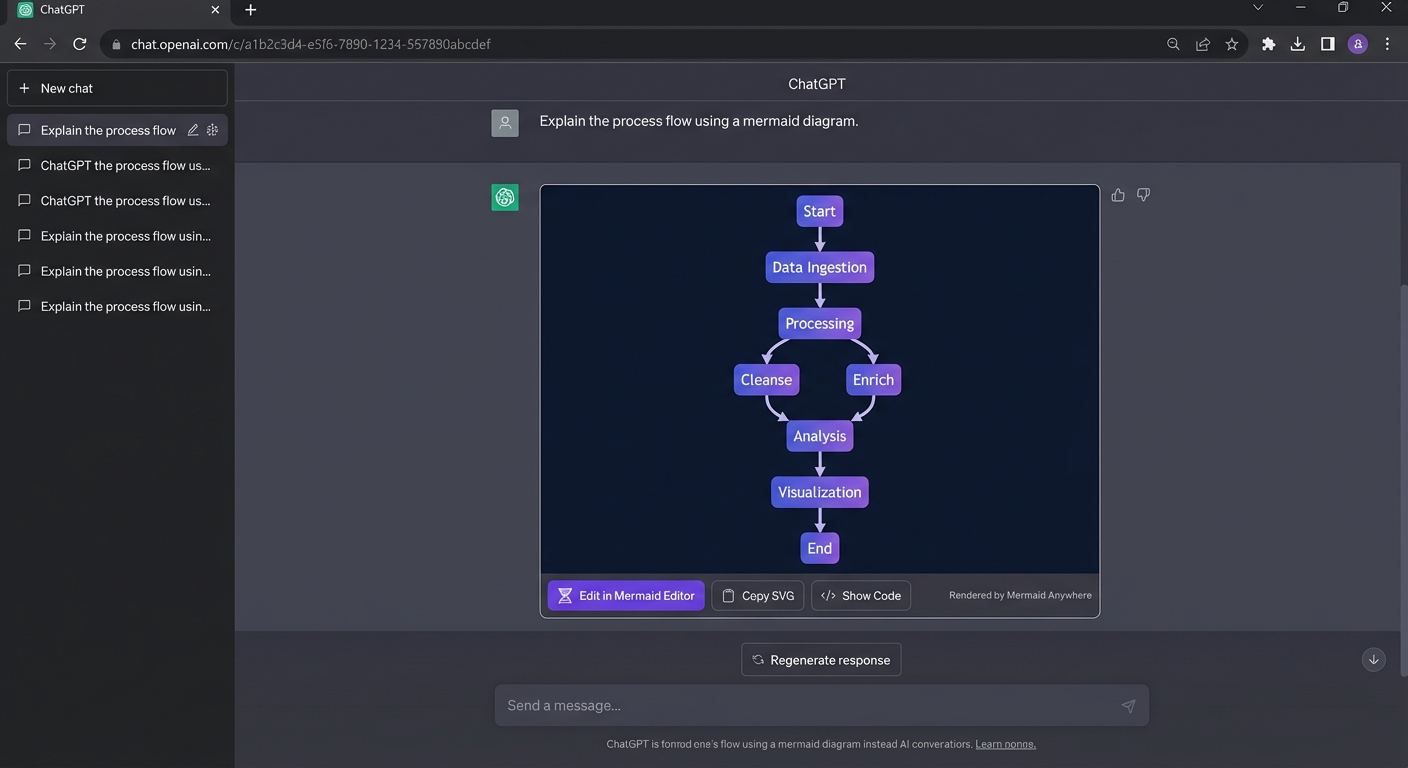
Toolbar rendering a Mermaid diagram on ChatGPT
Privacy & Security
Zero data collection
No analytics, no telemetry, no tracking. The extension collects absolutely no data about you or your browsing.
100% local rendering
All Mermaid rendering happens locally in your browser. Your diagram code never leaves your machine.
No network requests
The extension makes zero network requests. No data is sent to any server, ever.
Open source
The full source code is available on GitHub. Audit it yourself.
Troubleshooting
Diagram not rendering on a page
- Ensure the code block has a language-mermaid or language-mmd CSS class
- Try refreshing the page — the extension runs at document_idle
- Check that the extension is enabled in chrome://extensions
- Some sites lazy-load content — scroll to the code block and wait a moment
Diagram shows an error message
- Check your Mermaid syntax — try pasting the code in mermaideditor.io to validate
- Ensure the code doesn't include ``` markdown fences
- Some diagram types require specific Mermaid versions — the extension ships with Mermaid 11.4
Extension icon doesn't appear
- Click the puzzle icon in Chrome's toolbar and pin Mermaid Anywhere
- Verify the extension is installed at chrome://extensions
Copy SVG button doesn't work
- Some sites restrict clipboard access — try right-clicking the diagram and using browser copy instead
- Ensure the page is focused (click on the page first)
Still having issues? Open a bug report with your browser version, the site URL, and the Mermaid code that isn't rendering.
Report a BugDevelopment & Contributing
Mermaid Anywhere is open source and MIT licensed. Contributions are welcome.
Build from Source
1. Clone the repository
git clone https://github.com/starmorph/mermaid-anywhere.git
cd mermaid-anywhere
2. Install dependencies
pnpm install
3. Start development mode (watch & rebuild)
pnpm dev
4. Build for production
pnpm build
5. Load in Chrome
Open chrome://extensions, enable Developer mode, click “Load unpacked”, and select the dist folder.
Project Structure
mermaid-anywhere/
├── src/
│   ├── content/        # Content script (detector + injector)
│   │   ├── detector.ts # Finds Mermaid code blocks on the page
│   │   ├── injector.ts # Replaces code blocks with rendered SVGs
│   │   ├── styles.ts   # Shadow DOM styles for diagrams & toolbar
│   │   └── index.ts    # Entry point
│   ├── offscreen/      # Offscreen document for mermaid.js rendering
│   │   ├── offscreen.html
│   │   └── offscreen.ts
│   ├── shared/         # Shared types and constants
│   └── background.ts   # Service worker (message routing)
├── assets/             # Extension icons
├── manifest.json       # Chrome extension manifest (MV3)
└── package.json
Ready to Try Mermaid Anywhere?
Install the extension and render Mermaid diagrams on any website — no configuration required.